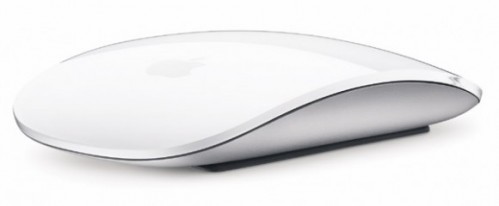
Well, I happened to stop at an Apple Store yesterday, specifically to take a look at the 27″ iMacs and even more specifically to get my grimy little fingers on a Magic Mouse. I’ve had lengthy thoughts about those touch-pad mice, and I was curious to see what the real thing was like. Because, honestly, I felt they could be AWESOME, but I also had serious doubts about them.
In the end, the salesguy (Amy liked his glasses) pretty much sold me on the awesomeness of the 27″ iMac, but I left the store unconvinced about the Magic Mouse.
Here’s a review of my brief hands-on with it:
This mouse is gorgeous. It’s white and shiny and translucent and I wanted to touch it from the first time I saw it. Pictures cannot capture it. Of course, I suspect that two weeks of using it will leave it filthy and scratched.
Thankfully, the mouse actually, physically *clicks*. The left and right side depress with a satisfying snick. I worried that it was like a touchpad, and you’d have to lift your fingers off the mouse and then just touch it to click, but it’s got a mechanical click, so that’s okay. I like to drum my fingers on the surface of the mouse, and a fully-touchpad-mouse wouldn’t work at all for me.
There are two buttons on this mouse. No more, no less. So, if you’ve got a customized something-or-other set up with the side buttons on your current Mighty Mouse, you’re out of luck. (I don’t — I have never found those side buttons possible to use.)
The scrolling is effortless, and works well through almost the whole top of the mouse. I liked it. A lot. You can also scroll side to side, which is like the little ball on the top of the Mighty Mouse does, and I find that exceedingly useful in my day-to-day life.
The swiping (using two fingers side-to-side) was also effortless, and I liked it a lot as well. I just don’t think I’d ever use it. You can swipe back and forth to go “back” and “forward” in Safari, but the backspace key works just as well (perhaps better) and I hardly ever use the “forward” button. Do you?
Unfortunately, there isn’t a middle button. On most mice, you can click the scroll wheel, and that just might be my most-used button. I click the middle button to open new tabs in Firefox for browsing, and I click the middle button to close those tabs. Living without a middle button drives me so nuts that when my mouse when on the fritz recently, I surreptitiously traded mice with the guy at the desk beside me.
The salesguy with the great glasses told me that Apple was able to add functionality to the mouse just through a software update, and there were rumours of the pinch-to-zoom gesture being added as well as possibly a three-finger click to replace the middle button. That’s not ideal, but it might work for me. I worry that pinch-to-zoom would be accidentally triggered by a finger plus the ball of my thumb, resting on the mouse.
I’m also disappointed that this is a battery powered mouse. I never use my mouse more than a few inches from my computer — I don’t need the flexibility of a cordless mouse. It seemed responsive and snappy when I used it at the Apple Store, but I’m not going to be pleased that I have to dump new batteries in it every few months.
Verdict: Good, but not great. If you get it included when you buy a new Mac, you’ll probably do just fine with it, although some of the little annoyances I’ve noted above will bother some people more than they bother others.
But under no circumstances should you go spend $69 (!) to get this mouse as a stand-alone accessory.
Now, about the delicious 27″ iMac … did I mention that it’s as big as a TV, that it has more-than-high-def 2560 x 1440 resolution and that they sell wall-mount kits for it?









Now that could be interesting! Overhauling a whole writing system and not just a computer system.